
PreK–Kindergarten and Grades 1, 2, and 3
Toggle switches to enable or disable the PreK–Kindergarten and Grades 1, 2, and 3 sections are currently available only in the Google Play version of the Starfall App, and are coming soon to the iOS app. These features can be accessed by Starfall members and subscribers.
Grades 4 and 5
The Grades 4 and 5 section is the newest branch of Starfall, available by default for all Starfall members and subscribers. Guest users can preview a demo version with a selection of free activities.
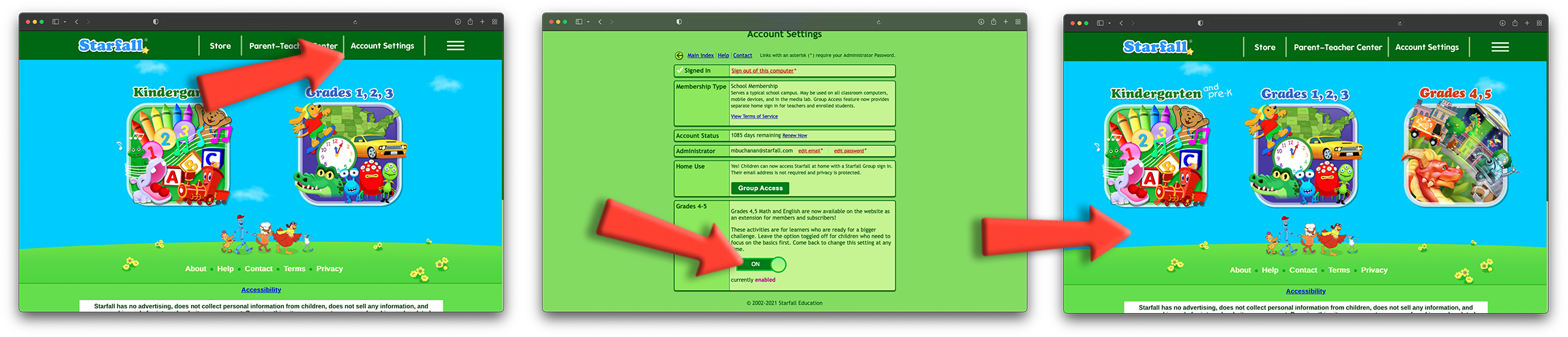
Members have the option to disable or re-enable Grades 4 and 5 via Settings.
Sign in to your account and go to Settings.
Scroll down to the Grade 4, 5 section and click the toggle switch.
Exit Settings.
Grades 4 and 5 will either appear or disappear from the home page based on your selection.